> For the complete documentation index, see [llms.txt](https://tools.continis.io/llms.txt). Markdown versions of documentation pages are available by appending `.md` to page URLs; this page is available as [Markdown](https://tools.continis.io/subassets-toolbox/samples/subassetawareso.md).

# SubAssetAwareSO

`SubAssetAwareSO` is an example of a ScriptableObject that is "aware" of its sub-assets, in that it uses a `List` to keep references to them so that their reference can be always retrieved at runtime.

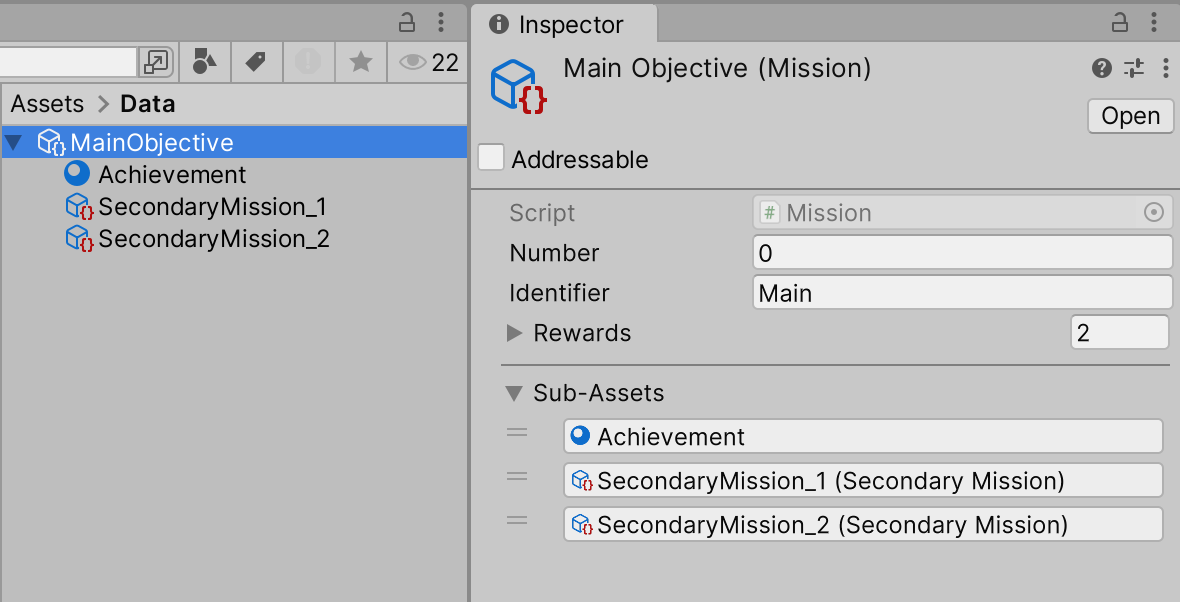
In this sample, the list is displayed in the asset's Inspector using a **custom editor**, so the user is informed of which sub-assets are present even when the main asset is not expanded in the Project window.

<figure><img src="/files/2ryp01EKsmQkWjqNmhkJ" alt=""><figcaption><p>The MainObjective SO contains 3 sub-assets,<br>which are visualised at the end of its Inspector</p></figcaption></figure>

The sub-assets can be reordered in the list, though this is purely for tidying up in case they were added in an odd order, as it doesn't modify any functionality.

At runtime, the methods of `SubAssetAwareSO` can be used to access its sub-assets by name, or by class.

You can use this class as a starting point, and implement your own powerful "sub-asset aware" ScriptableObjects.

***

### GetSubAssetByName

```csharp
public virtual Object GetSubAssetByName(string subAssetName);
```

Returns the first sub-asset that has the specified name (Null if no sub-asset with this name is present).

### GetAllSubAssetsByName

```csharp
public virtual List<Object> GetAllSubAssetsByName(string subAssetName);
```

Returns all sub-assets that have the specified name (or an empty List if no sub-assets were found).

### GetSubAssetByType

```csharp
public virtual Object GetSubAssetByType<T>();
```

Returns the first sub-asset of the specified type (Null if no sub-asset of that type is present).

### GetAllSubAssetsByType

```csharp
public virtual List<Object> GetAllSubAssetsByType<T>();
```

Returns all sub-assets of the specified type (or an empty List if no sub-assets were found).


---

# Agent Instructions
This documentation is published with GitBook. GitBook is the documentation platform designed so that both humans and AI agents can read, navigate, and reason over technical content effectively. Learn more at gitbook.com.

## Querying This Documentation
If you need additional information that is not directly available in this page, you can query the documentation dynamically by asking a question.

Perform an HTTP GET request on the current page URL with the `ask` query parameter:

```
GET https://tools.continis.io/subassets-toolbox/samples/subassetawareso.md?ask=<question>
```

The question should be specific, self-contained, and written in natural language.
The response will contain a direct answer to the question and relevant excerpts and sources from the documentation.

Use this mechanism when the answer is not explicitly present in the current page, you need clarification or additional context, or you want to retrieve related documentation sections.