> For the complete documentation index, see [llms.txt](https://tools.continis.io/llms.txt). Markdown versions of documentation pages are available by appending `.md` to page URLs; this page is available as [Markdown](https://tools.continis.io/fast-enter-play-mode/setting-up.md).
# Setting up
{% hint style="info" %}
Please note: this utility is only compatible with Unity 6.3 and up.
{% endhint %}
## Enabling the button
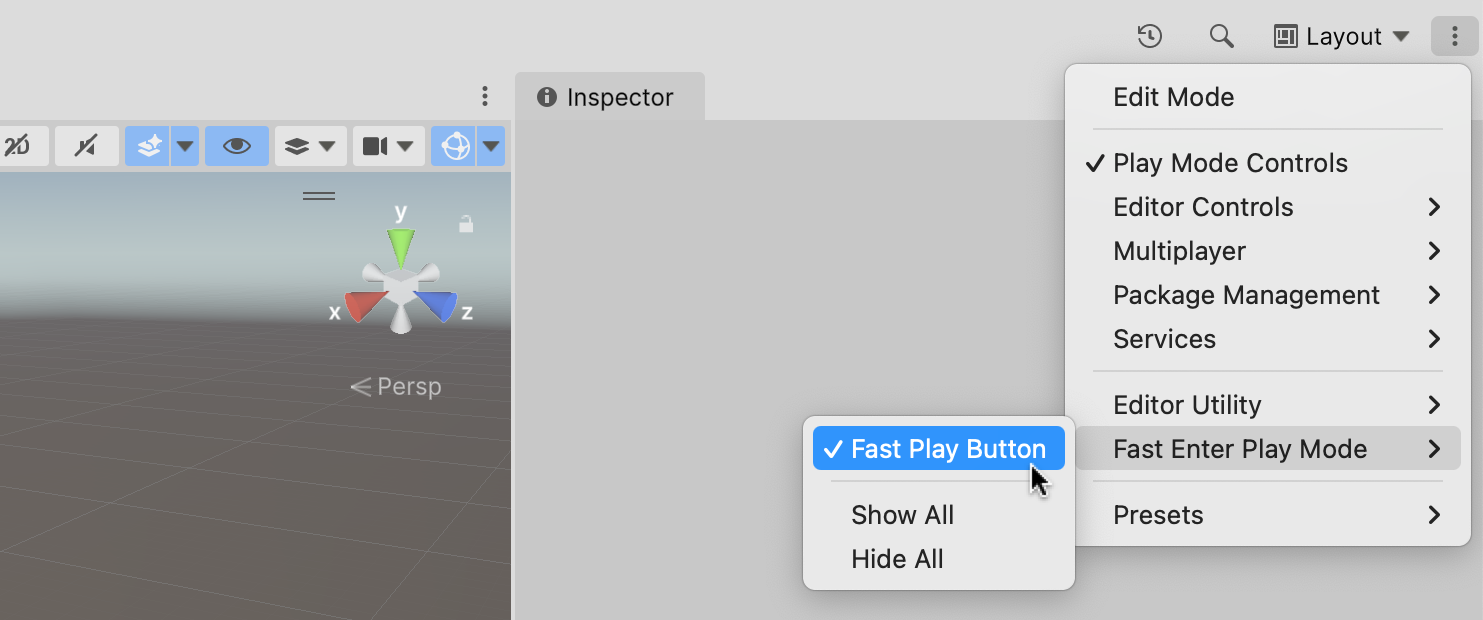
To display the Fast Enter Play Mode button in the main Unity toolbar, click on the 3 dots in the top-right corner of the Unity editor, then choose **Fast Enter Play Mode > Fast Play Button**:
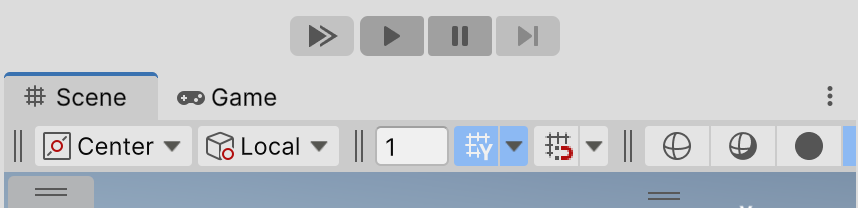
Once the button has appeared, you can drag it to any position in the toolbar by holding Ctrl (or Cmd on Mac) and dragging with the Left Mouse button.
We recommend placing the button on the left of the Play Button, for easy access:
## Setting Enter Play Mode Settings
For the button to make sense, you want the setting in **Project Settings > Editor >** **Enter Play Mode Settings** to be set to its default value, which is *Reload Domain and Scene*.
This way, whenever you press the Fast button, you get "fast mode"; while pressing the regular Play button allows you to go into Play mode with a clean slate.